Smart Display ESPHome Project
This project implements a smart display using an ESP32, ILI9342 TFT display, XPT2046 touchscreen, and ESPHome. It integrates with Home Assistant to display weather, media, notifications, and air quality, with interactive touch and sound feedback.
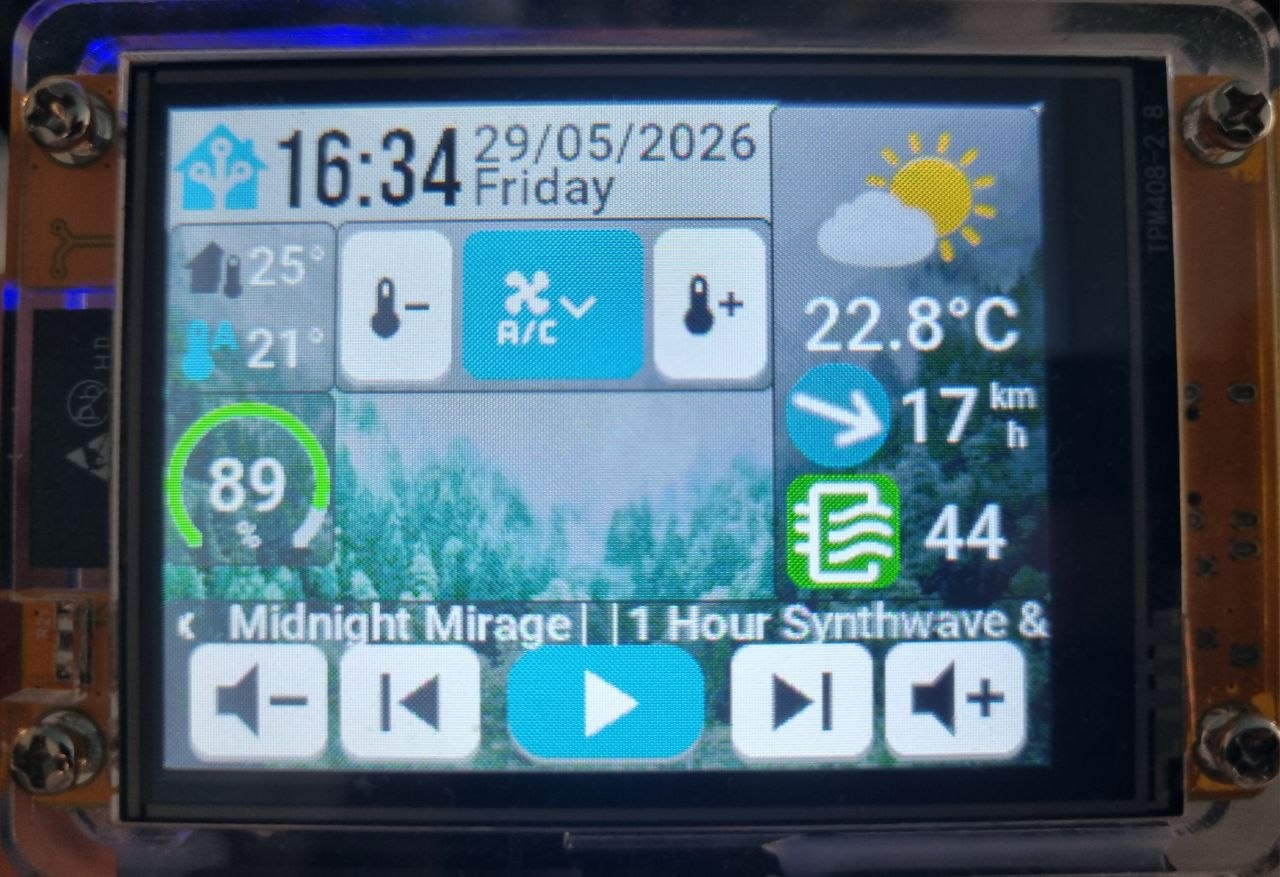
Inspired by https://github.com/1achy/ESPHOME-esp32-2432s028r-LCD
Features
🌤 Weather Display
- Shows current temperature, condition, and wind speed from Home Assistant’s
weather.forecast_home. - Dynamic weather icons update based on condition (
sunny,rainy,fog, etc.). - Displays temperature in °C and wind speed in km/h.
🎵 Media Player Integration
- Works with any Home Assistant media player (e.g.,
media_player.kitchen). - Displays media title, play/pause, next/previous, volume, and volume controls.
- Updates play/pause icon dynamically.
🔔 Notifications
- Pop-up notifications from Home Assistant.
- Notifications can include text and sound.
- RTTTL melodies play on notification:
- Predefined options:
nokia_pop,notify_high,two_short,long,siren,scale_up,star_wars,mission_imp,mario.
- Predefined options:
- Tap on notification popup to stop sound and dismiss.
🌬 Air Quality Index
- Displays AQI from Home Assistant sensor
sensor.air_quality_index_lviv. - Shows numerical AQI on the display.
⏱ Screen Management
- Backlight automatically turns off after a configurable timeout.
- Tap screen to wake display.
- Configurable brightness.
⚡ RTTTL Sound
- Plays melody sounds on notification events.
- Volume can be controlled via ESP32 PWM output.
- Melodies can be selected via ESPHome select component.
- Tap notifications to stop sound immediately.
📶 Wi-Fi & Home Assistant
- Connects via Wi-Fi or opens fallback captive portal.
- Integrates seamlessly with Home Assistant API.
- OTA updates supported.
Setup Instructions
- Flash ESP32 with ESPHome firmware.
- Configure Wi-Fi or use captive portal to connect to network.
- Add device to Home Assistant.
- Ensure Home Assistant entities:
weather.forecast_homemedia_player.kitchensensor.air_quality_index_krakow_air_quality_index
- Configure select box for melody notifications in ESPHome UI or Home Assistant.
Notes
- RTTTL playback stops when tapping notification popup.
- Screen timeout is configurable via ESPHome number component.
- Uses Home Assistant API to fetch live data.
- Works with Cyrillic and extended glyphsand material UI https://pictogrammers.com/library/mdi/